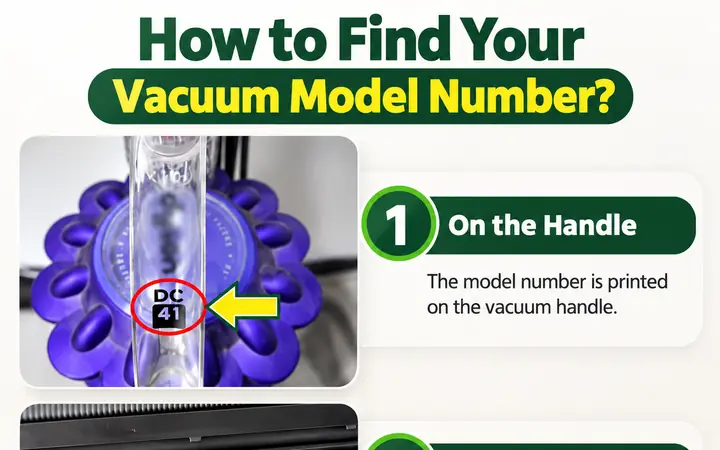
Most replacement parts are made for specific machines, so the model number is the single most useful thing to know before you order. Two vacuums from the same brand can look alike and still use different filters. A couple of minutes spent finding the right number can save you a return later.
This guide explains where to look, how to read what you find, and what to do when the label is missing or worn.
Why the Model Number Matters
A brand name or product family tells you the type of vacuum you own. The model number tells you which version it is. That difference matters because a filter that fits one version may not seal properly in another, even when both share a similar name.
Once you have the number, you can compare it with a product’s compatibility list instead of guessing from photos.
Where to Look for the Model Number
Label locations vary by brand, by vacuum type, and even between models from the same brand, so there is no single spot that works for every machine. Work through these places in order:
On the Vacuum
- Look for a sticker, plate, or printed label on the body of the vacuum.
- Check the areas you don’t see during normal use, such as the underside or the back of the machine.
- Turn the vacuum off and unplug it or remove it from its charger before you move or open anything.
- Use a flashlight or take a photo with your phone if the print is small or hard to read.
In Your Paperwork
- Your owner’s manual or quick-start guide, which often names the model on the cover or first page.
- The original box, if you kept it.
- Your order confirmation or store receipt.
- Any registration or warranty confirmation you received from the manufacturer.
From the Manufacturer
If you can’t find a label, the manufacturer’s website or customer support team is the best place to ask. Your current filter may also help, because some filters carry a part number, as explained below.
How to Read What You Find
A label may show several numbers, and they don’t all mean the same thing:
- Model number: identifies the version of the vacuum. This is the number you need for compatibility.
- Serial number: identifies your individual machine. It usually won’t help you choose a part.
- Product family name: a name such as Navigator or CleanView covers a group of models, so it isn’t enough by itself.
Copy the model number exactly, including letters and any characters at the end. Small differences can matter. On NOONEVA product pages, for example, the Shark Navigator NV350 filter kit lists NV350, NV351, and NV352 as separate entries, and the Bissell CleanView filter kit lists 9595, 9595A, and 9595R. If your number isn’t listed, don’t assume that a close match will fit.
Use Part Numbers as a Second Check
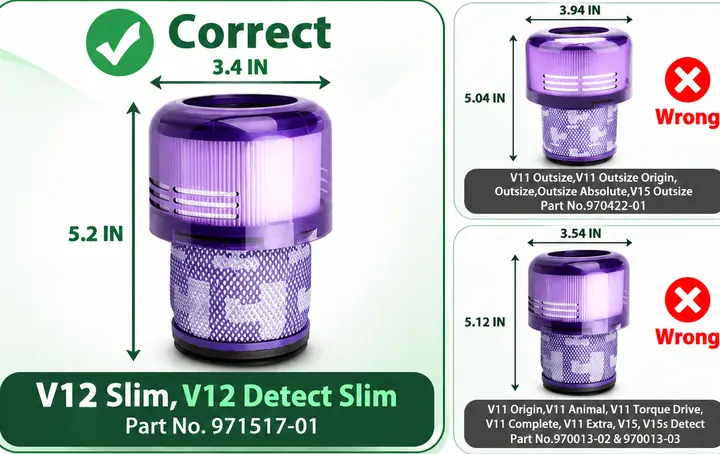
A part number identifies the filter or part itself, not the vacuum. If your existing filter or your manual shows one, compare it with the references on the product page. Part numbers are especially helpful when your model has more than one possible filter or when two models look nearly identical.
Treat a part number as a cross-check rather than a replacement for the model number. For the full process, read how to check product compatibility.
How to Avoid an Incompatible Purchase
- Take a clear photo of the label so you have the exact number when you shop.
- Don’t rely on the product family name alone.
- Don’t choose a part based only on color or overall appearance.
- Compare your current filter’s shape and size with the product details.
- Ask before you order if anything doesn’t match.
What to Do Next
Once you have your model number, enter it in the NOONEVA vacuum model search, or browse parts for Dyson-compatible, Shark-compatible, or Bissell-compatible models. Then confirm that your exact number appears in the product’s compatible models.
Still not sure? Contact us with your model number and, if you have it, your current filter’s part number. If your filter is due for attention, see when to replace your vacuum filter.